


People love saying: if it works, don’t touch it.
And to be fair... that’s partly true.
The catch is that in some projects, “it works” only means the page opens in a browser. That does not automatically mean it works well for SEO, well for content, or well for the business.
For a long time, AppCrates was built as a classic Vite + React app. Locally? Great. Fast HMR, simple setup, no unnecessary ceremony. For prototyping, internal tools, or apps where SEO doesn’t really matter, Vite is honestly excellent.
But AppCrates is not an internal dashboard. It’s a services website. It needs to attract traffic, rank in search, showcase projects, publish articles, explain services, and convert visitors into leads.
And that’s exactly where the cracks started to show.
The biggest one was brutally simple:
Googlebot was seeing almost empty HTML.
Vite was great... until it wasn’t enough anymore
In theory, everyone knows Google can render JavaScript.
In practice? That’s where things get messy.
It’s not like Google always executes everything perfectly, patiently waits for API calls, renders your components, and fully understands your metadata exactly the way you intended. Sometimes it does. Sometimes it doesn’t. Sometimes it does it later. Sometimes only partially.
And if you’re building a blog, a services site, or SEO-focused landing pages, “sometimes” is not good enough.
What Googlebot was effectively getting looked more like this:
<!DOCTYPE html>
<html>
 <head>
 <title>AppCrates</title>
 </head>
 <body>
 <div id="root"></div>
 <script src="/assets/index-abc123.js"></script>
 </body>
</html>
So in plain English:
- the user with JavaScript sees the real page,
- the bot initially sees an empty shell,
- the actual content appears only after the app boots.
And the question is: can you live with that?
Sure.
But only up to a point.
The first band-aid: an edge function for crawlers
Before I did the full migration, I tried to patch the problem.
I had a dedicated Netlify edge function, social-crawler.js, detecting bots via User-Agent and serving them prerendered HTML instead of the empty SPA shell.
Did it work? Yes.
Was it elegant? Not really.
This was one of those solutions that helps at first, but then slowly turns into its own little ecosystem. I had to maintain an extra layer of logic just so crawlers could get what the application should have been serving in the first place.
Every new page meant more work.
Every HTML change risked breaking what the bot saw.
Every new feature added more “temporary” logic that was becoming less temporary by the week.
At some point it started feeling like I was building a separate SEO system next to the actual website.
And when you get there, it usually means the architecture is trying to tell you something.

Why I ultimately moved to Next.js
This was not a “Next.js is trendy, so let’s move” kind of decision.
I didn’t migrate because the framework was fashionable. I migrated because the SPA model had stopped fitting the kind of product I was building.
I needed a few things that, at that point, were simply NON-NEGOTIABLE.
1. Bots had to get real HTML immediately
No tricks.
No edge function pretending to be SSR.
No hoping Google would sort it out later.
With Next.js App Router, the bot gets fully rendered HTML on the first request. That was the whole point.
2. Metadata and JSON-LD needed to be part of the app, not a patch
In SPA setups, metadata often ends up being one of these:
- static values in
index.html, - client-side updates,
- or some awkward hybrid workaround.
That may be enough for a small app. It stops being enough when you’re dealing with dynamic CMS-driven pages and you actually care about SEO.
In Next.js, each route can have its own generateMetadata, it runs on the server, and it can fetch content from Sanity asynchronously. Which is exactly how this should work.
3. Caching finally started making sense
In the old setup, Sanity queries were being executed over and over without any real central strategy.
After the migration, caching lives in the data layer instead of being scattered all over the app. And once that happens, the whole thing becomes much more predictable.
What the architecture looks like after the migration
Routing with App Router
The new structure is based on src/app, so routing is now simple and natural:
src/app/
 page.tsx → /
 about-me/page.tsx → /about-me
 blog/page.tsx → /blog
 blog/[slug]/page.tsx → /blog/:slug
 project/[slug]/page.tsx → /project/:slug
 uslugi/[slug]/page.tsx → /uslugi/:slug
 faq/page.tsx → /faq
 privacy-policy/page.tsx → /privacy-policy
 robots.ts → /robots.txt
 sitemap.ts → /sitemap.xml
 not-found.tsx → 404
And this is one of those things you appreciate more after the migration than during it.
No weird syncing. No extra SEO side system. No keeping half the logic outside the actual app. robots.txt and sitemap.xml are handled natively instead of being glued together somewhere off to the side.
Server Components vs Client Components
This was one of the most important parts of the rebuild.
The rule was simple:
What the bot needs to see, the server renders.
What the user needs to feel, the client can handle.
Server Components handle:
- fetching content from Sanity CMS,
- metadata like
title,description, Open Graph, and canonicals, - structured data / JSON-LD,
- blog content rendering,
- everything that should exist in the HTML from the start.
Client Components handle:
- animations and visual effects,
- forms,
- cookie consent,
- analytics,
- FAQ accordions, view tracking, and interactive UI.
It sounds obvious when you write it down.
But once you actually split the app that way, you realize how many things were previously living in the wrong place.
Data layer and caching
Instead of configuring caching route by route, I centralized it in the Sanity fetcher:
async function fetchSanity<T>(
 query: string,
 params?: Record<string, unknown>
): Promise<T> {
 return client.fetch(query, params || {}, {
 next: { revalidate: 3600 },
 });
}
So in short:
- Sanity data is cached for one hour,
- caching happens at the data level,
- I don’t have to solve the same problem separately on every route.
And that turned out to be the right decision, especially because some routes are dynamic anyway.
Cookies, language, and a deliberate trade-off
AppCrates handles language through cookies.
That matters, because once a route reads cookies(), Next.js treats it as dynamic. Which means you lose fully static route generation in the classic sense.
To some people that immediately sounds like a downside.
To me, not necessarily.
Because the real question isn’t: “Can I force this to be more static?”
The real question is: “Does the user get the correct language on the very first render, without UI flicker after hydration?”
In my case, the answer is yes.
So the trade-off is intentional:
- downside: less full-route static output,
- upside: the correct language appears immediately.
In this setup, data cache does most of the heavy lifting. And that’s enough.
Netlify: the problem I almost overlooked
The code migration was only half the work.
The other half was hosting.
And this is where something very easy to miss showed up: you can rewrite the whole app correctly in Next.js and still have production behave like the old SPA.
That is exactly what happened to me.
AppCrates was deployed on Netlify, originally configured for Vite:
- the publish directory pointed to
dist, - some settings lived in the Netlify UI,
- old SPA fallback redirects were still active.
The result?
The code was already Next.js.
But the hosting setup was still mentally living in the Vite world.
So I had to handle separately:
- switching
netlify.tomltonpm run build:next, - detaching the old
dist, - removing SPA fallback redirects,
- disabling the
social-crawleredge function, - keeping the AI edge function at
/api/ai-generate, because that still made sense as a separate unit.
And the lesson here is simple:
Migrating the framework and migrating the hosting are NOT the same task.
You can have good Next.js code and still ship a bad deployment.
And then everything behaves as if the app were still an old SPA.
What broke along the way
No migration is clean from start to finish. Mine definitely wasn’t.
1. The in-between state in the repo
For a while, the repository had all of these living side by side:
- new Next routes,
- old Vite files,
- legacy folders,
- components that were “kind of migrated” but not fully removed.
Which is basically the classic state of: “it works, but nobody knows what the source of truth is.”
Eventually I did a full cleanup and documented what stayed, what moved, and what was removed. Good decision, because leaving that mess for later only creates more technical debt.
2. First render with invisible text
This one was especially annoying.
Locally, the CSS loaded, but some text remained invisible until refresh or hydration finished. The culprit was animation initial state hiding content before the client fully kicked in.
So yes, the usual suspects:
opacity: 0,- entrance animations after hydration,
- above-the-fold content disappearing for no good reason.
The fix was simple, but important:
- changing animation initial states,
- making sure critical content was visible in the server HTML,
- removing effects that looked nice in demos but hurt the first render.
Fancy motion is great.
Not when it hides the very thing the user came to see.
3. Windows being Windows
There were also some completely non-application issues:
- hanging Node processes,
- port
3000already in use, .next/tracebeing locked,EADDRINUSEandEPERMerrors.
So not app bugs. Just the environment deciding to pick a fight.
The usual fix was either:
- checking which process was holding the port,
- or just using
taskkill /F /IM node.exe.
4. Temporarily disabling TypeScript and ESLint during build
Right now, next.config.ts still includes:
typescript
eslint: { ignoreDuringBuilds: true },
typescript: { ignoreBuildErrors: true }
And no, not because types don’t matter.
The reason is much simpler: some legacy Vite-era files still contained historical type and lint issues unrelated to the new Next architecture, but they could still block the build.
Production is green.
Bringing TypeScript and ESLint back to full strictness is a separate cleanup stage, not something I wanted to mix into the migration itself.
And that distinction matters.
You do not need to solve everything at once.
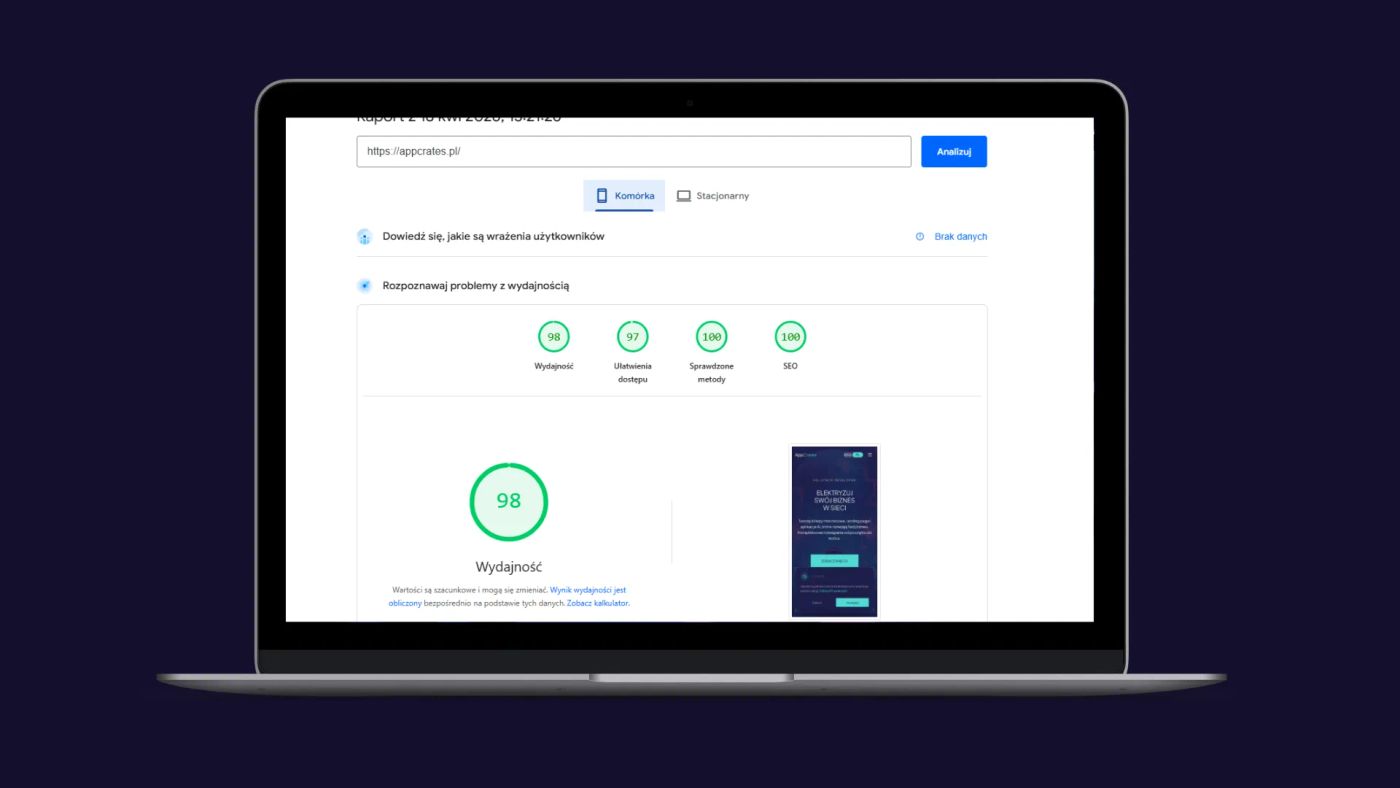
What the migration actually improved
SEO finally stopped being a fight
The biggest gain is very simple:
Googlebot now gets complete HTML on the first request.
No JavaScript required.
No waiting.
No crawler-specific workaround.
No guessing whether the bot sees the same thing as the user.
On top of that, every page now has route-specific metadata generated server-side from Sanity content. So instead of one global “AppCrates” style setup, the SEO layer actually reflects the content of each page.
Structured data stopped being an afterthought
JSON-LD is no longer something injected later on the client. It’s rendered where it should be from the start.
Small thing? Maybe.
But proper architecture is usually built out of small things done right.
The project became easier to scale
New service page?
New content type?
New CMS-driven section?
With App Router, everything has a natural place. I no longer need crawler exceptions, metadata hacks, or side systems trying to keep up with the app.
Better analytics
The migration was also a good excuse to improve analytics.
Instead of tracking only pageviews, I added actual conversion-focused events:
- entering the form area,
- first interaction,
- phone or email clicks,
- form submission,
- lead generation.
And suddenly the data tells me more than “someone visited.” It starts telling me whether the traffic is actually worth anything.
That’s a completely different conversation.
What I learned from this migration
1. Don’t redesign everything during a technical migration
This is very tempting. Since you’re already changing the architecture, why not also rebuild the UI, redesign sections, update everything, and make it all “better”?
Because that’s how scope explodes.
In my case, the visual layer stayed mostly the same. src/components/new/* was still doing its job. I changed the engine, not the bodywork.
That was the right call.
2. Hosting is part of the migration, not an afterthought
If someone migrates the framework and assumes deployment will somehow sort itself out, they’re going to hit a wall very quickly.
Code is one thing.
Infrastructure is another.
Both need to be finished together.
3. Dynamic rendering is not a failure
Sometimes people talk about static rendering like it’s some kind of religion.
But if the app actually needs per-user context — language, session, personalization — then dynamic rendering can simply be the correct choice.
The goal is not to force everything into static output.
The goal is to make the architecture make sense.
4. Cleanup is not a “later” task
If you finish the migration and leave half the repo sitting in a “legacy, don’t touch it” state, that mess will come back to you on the next task.
Maybe not today.
But it will.
5. Documentation becomes most useful a little later
Not in the middle of the migration.
Not the day after deployment.
But two weeks later, when you come back and start asking yourself:
- what is the source of truth,
- what is left from the old setup,
- why production behaves differently from local.
That’s when good documentation saves a lot of time.
Final thoughts
Migrating AppCrates from Vite to Next.js App Router was not just a tool change.
It was a change in how the whole website operates.
I moved from an SPA model where SEO required external workarounds to an architecture where rendering, metadata, and data fetching are server-driven by default.
And that changes everything.
If you’re building:
- a services website,
- a blog,
- a portfolio,
- or any project that actually needs to be visible in search,
then at some point a classic SPA starts demanding more and more band-aids. And sooner or later you realize you’re spending more time working around architectural limits than actually improving the product.
At that point, it’s worth asking a very simple question:
Do you want to keep patching it... or do you want to rebuild it on the right foundations?
I chose the second option.
And honestly?
I should have done it sooner.
I help migrate frontend applications to Next.js App Router — including SEO, data layer architecture, hosting, and legacy cleanup. If your project is starting to choke inside an old SPA setup, feel free to reach out.